Troubleshooting - Invalid License - MLS Search
Problem: You reveivce "invalid license" when using MLS Search
Resolution: You don't have a valid license for crmls market entered into the website.

When you receive this error message, usually after trying to perform a search, your market was not properly defined in the setup.
-
Log into the WordPress Backend.
-
Go to the Appearance menu item then select Widgets
-
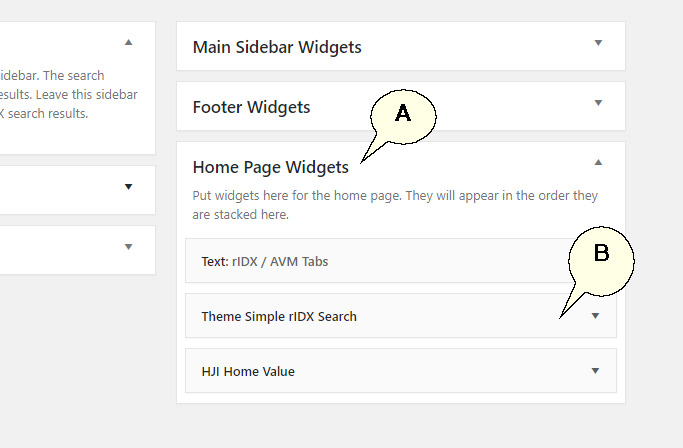
Go to 'Home Page Widgets' (A). Then select 'Theme Simple iIDX Search (B):
-
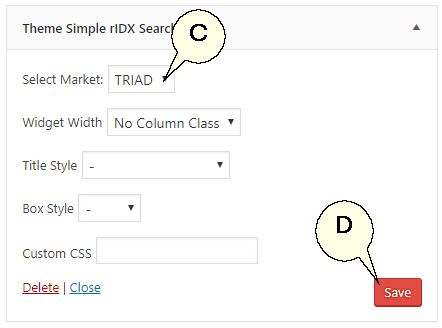
Verify that the correct Market is selected (C). If not, please contact Help-U-Sell Support. If correct, savings the widget again will correct the issue (D).
-
Next, verify the 'Search Results' page has the correct market entered. Go to Pages then All Pages
-
Edit the Search Results Page.
-
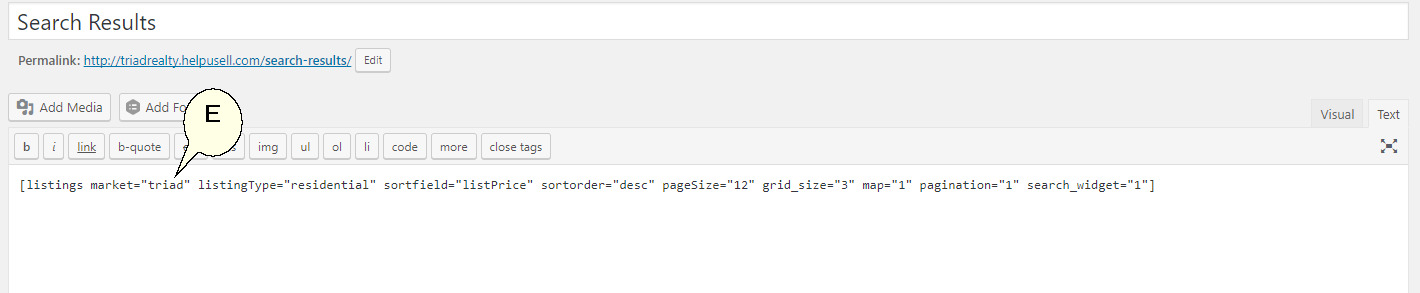
Verify the correct market is used in the Short Code (E). If not, recreate the Short Code using the rIDX plugin.